


account bridge
A Simple Way to Avoid Overdrafts
With linked accounts and automatic transfers, you'll spend less time worrying about balances and more time doing what matters. Login now to get set up.
How Account Bridge Works
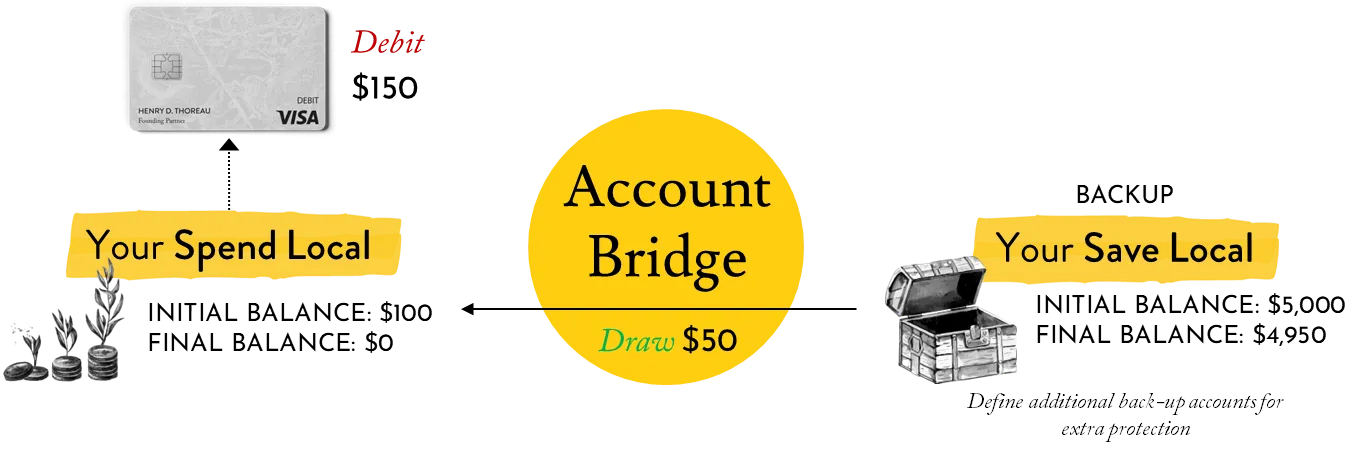
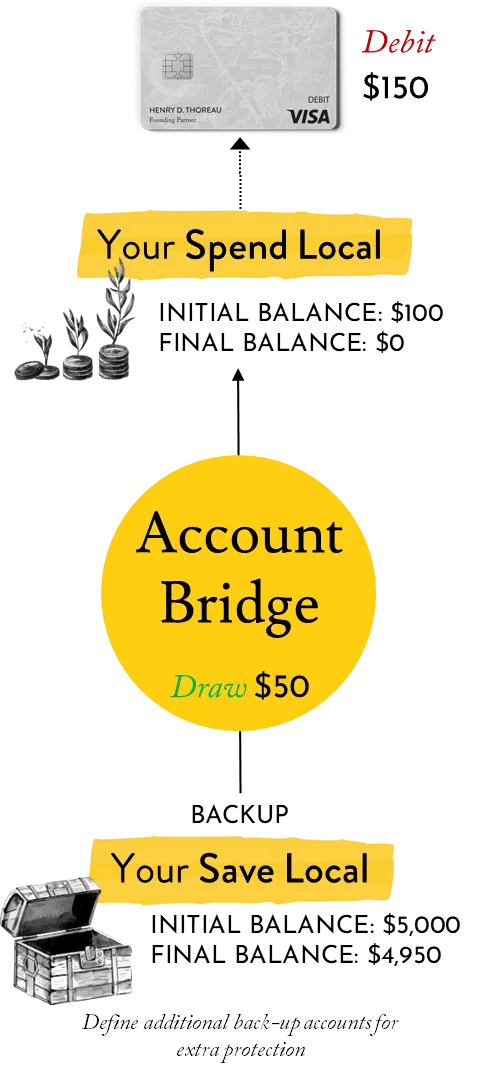
If your Spend Local balance dips too low to cover a transaction, Account Bridge can step in to help. Account Bridge automatically transfers funds from a backup account of your choosing to prevent a rejected payment.
Why Partners Love Account Bridge
Automatic Transfers
You don't have to move money manually.
Covers Transactions in Real Time
Fewer declined payments.
You stay in Control
Your funds, your accounts, your rules.
Easy to Enable
Login and look under "Money Movement".
You can add up to eight backup accounts, so that if your first backup account is also low, we'll automatically move on to the next one. This helps ensure your payments go through.
Already a Walden partner? Set up Account Bridge today in the "Money Movement" menu. Haven't joined us yet?
Frequently Asked Questions
Account Bridge is a new feature that makes it even easier to manage money across your Walden accounts. If your Spend Local account ever dips too low to cover a transaction, Account Bridge can automatically pull funds from a linked backup account of your choice (like your Save Local) to fill the gap. The automatic nightly transfer will be equal to the amount your account needs to cover the difference, rounded up to the nearest full dollar...It’s a quick, seamless process to help avoid fees and keep your payments running smoothly.
Account Bridge is an optional service! If you'd like to link your accounts, you can set it up by logging in and navigating to Money Movement > Account Bridge. Not interested? There’s nothing you need to do; it is an opt-in service.
Account Bridge is available for individual partners with more than one eligible Walden personal account. Partners can link their Spend or Grow Local accounts to other Walden Spend, Save, or Grow Local personal accounts. The partner must be a primary or joint owner on all accounts involved. Local Impact CDs and accounts for organizations are not eligible for Account Bridge.
Account Bridge is free! Set your preferences and we’ll take care of the rest. To keep everything running smoothly, we still recommend keeping an eye on your payments and balance. If a transaction posts to your account and your backup account can't cover it, there could be a fee. Check out our Account Charges page for a full list of account fees.
We’re happy to help with any changes! To unenroll, remove, or change the order of your backup accounts, simply log in and navigate to the “Communications” tab. Select “Account Service Request” and fill out the form for “Account Bridge Maintenance.” Once you’ve submitted your request, it will come directly to a member of the Partner Experience team and usually takes one business day to complete.
Account Bridge helps cover checks, ACH withdrawals, debit card transactions, and ATM transactions that might otherwise overdraw your account - as long as you have the available funds in your linked backup accounts. If there’s not enough money in one of your backup accounts, Account Bridge will move to your next backup account until there are enough funds to complete the transaction. If the balance is not available across all of your linked Walden backup accounts, Account Bridge won’t be able to transfer funds, and your payment may be declined (and fees could apply). It’s a good idea to keep an eye on your accounts, even if you have Account Bridge set up, to make sure your payments can go through.